Super God Mode for Windows: Access Every Hidden Setting
Unlock the complete potential of Windows with Super God Mode—a powerful PowerShell script that creates a comprehensive directory of thousands of hidden settings, shortcuts, and system features.
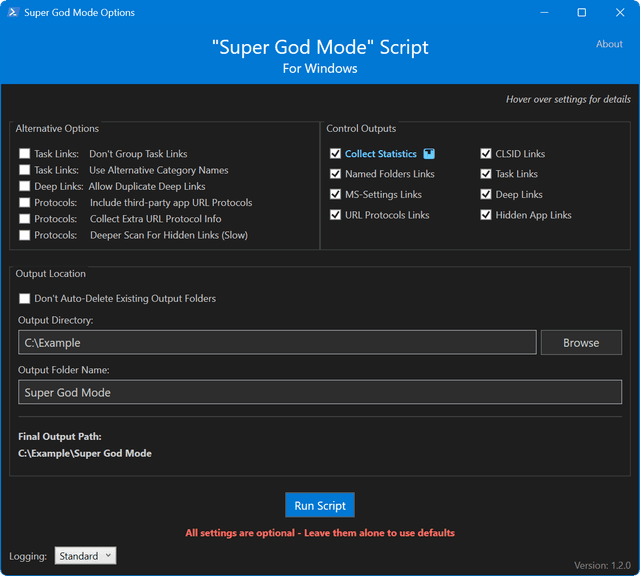
Overview
Ever wished you could access every hidden setting and system feature in Windows from a single location? Meet Super God Mode—a revolutionary PowerShell script that unlocks thousands of settings, shortcuts, and hidden features in one organized folder.
What is Super God Mode?
Super God Mode enhances Windows traditional "God Mode" folder. It creates a comprehensive directory containing CLSID Shell Folders, Named Special Folders, Task Links, Deep Link Settings, and URL Protocols—all automatically organized without permanent system changes.
Key Features
- Shell Folders Access: Shortcuts to Control Panel, admin tools, and system locations.
- Deep Link Navigation: Access hidden settings pages not listed in standard menus.
- Task Links: Direct links to specific Control Panel tasks.
- URL Protocol Support: Launch internal Windows apps and tools.
- CSV Export: Generate a detailed spreadsheet of all shortcuts.
- Intuitive GUI: User-friendly interface for effortless setup.
How to Use Super God Mode
Step 1: Download Script
Download Super_God_Mode.ps1 from the official ThioJoe/Windows-Super-God-Mode GitHub Repository.
Step 2: Enable Script Execution
Set-ExecutionPolicy -ExecutionPolicy Unrestricted -Scope ProcessStep 3: Run Script
.\Super_God_Mode.ps1Why Use Super God Mode?
- Save time navigating nested menus.
- Discover hidden settings and system tools.
- Keep shortcuts organized logically.
- Safe to run—creates shortcuts without registry changes.
Pro Tips
Pro Tip: Check out the generated CSV file after running the script for a complete reference inventory of all created shortcuts.
Related Articles
Subscribe to the Newsletter
Get real-world IT troubleshooting guides, Azure VDI case studies, and sysadmin automation tips in your inbox.