Disable Driver Signature Enforcement in Windows 11 (Advanced Startup)
Step-by-step guide to temporarily disable Driver Signature Enforcement in Windows 11 using Advanced Startup and Startup Settings.
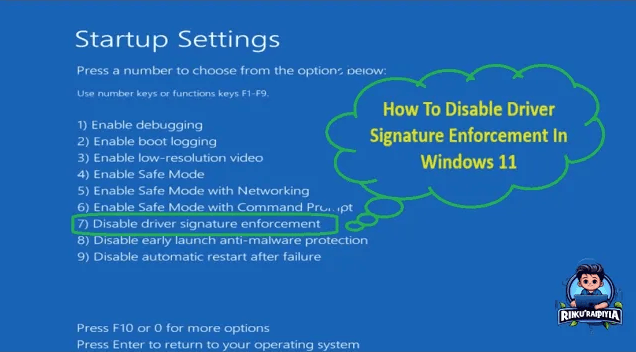
Overview
Driver Signature Enforcement blocks unsigned drivers from loading. For niche hardware or legacy tools, you may need to disable it temporarily. Follow this Advanced Startup path to turn it off, install the driver, and then reboot back to normal enforcement.
Important Notes
- This change is temporary for the next boot session.
- Only install drivers from trusted sources; unsigned drivers can pose security risks.
- You can re-enable enforcement by simply rebooting.
Video Walkthrough
Step-by-Step Guide
1) Open Advanced Startup
- Press Start → Power.
- Hold Shift and click Restart to boot into Advanced Startup.
2) Choose Troubleshoot
Select Troubleshoot on the Choose an option screen.
3) Go to Advanced options
Click Advanced options to access startup tools.
4) Open Startup Settings
Select Startup Settings, then press Restart.
5) Disable Driver Signature Enforcement
When the numbered list appears, press F7 (or 7) for Disable driver signature enforcement. Windows will reboot with enforcement off.
6) Install your unsigned driver
Install or run the unsigned driver or tool now. Remember: enforcement returns on the next reboot.
Re-enable Enforcement
Simply restart Windows. Driver Signature Enforcement will be back on automatically. If you want to verify, repeat the steps and confirm the option is no longer selected.
Wrap Up
Use this workflow only when necessary and keep sources trustworthy. After installing the required driver, reboot to restore the default protection layer.
Related Articles
Subscribe to the Newsletter
Get real-world IT troubleshooting guides, Azure VDI case studies, and sysadmin automation tips in your inbox.